Use full width
The page extends into the space beside Safari's controls instead of leaving it blank.
On the iPhone Duo's front screen, Safari keeps its controls in a sidebar — and most websites leave the space beside them empty. Roomy lets you fix that, one website at a time.
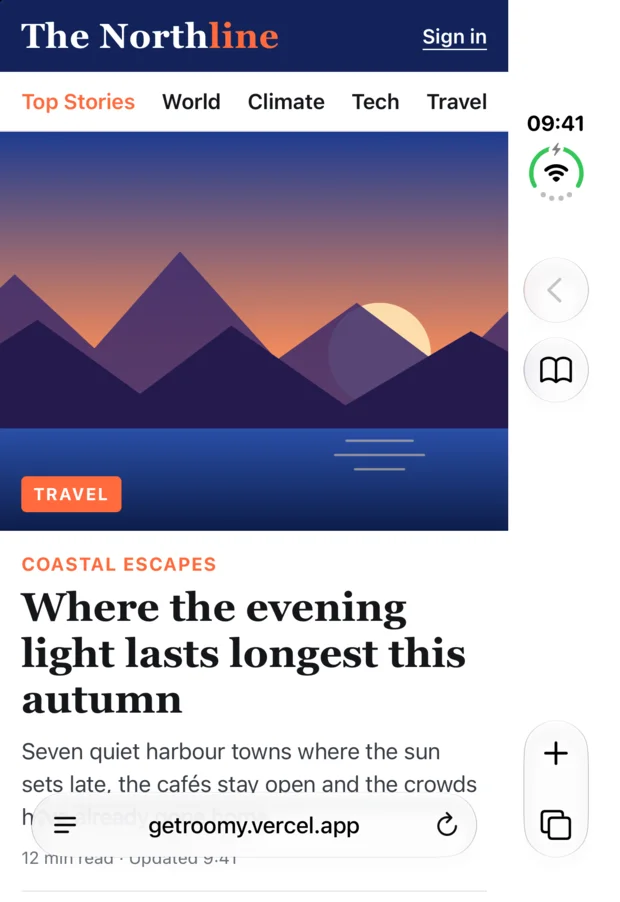
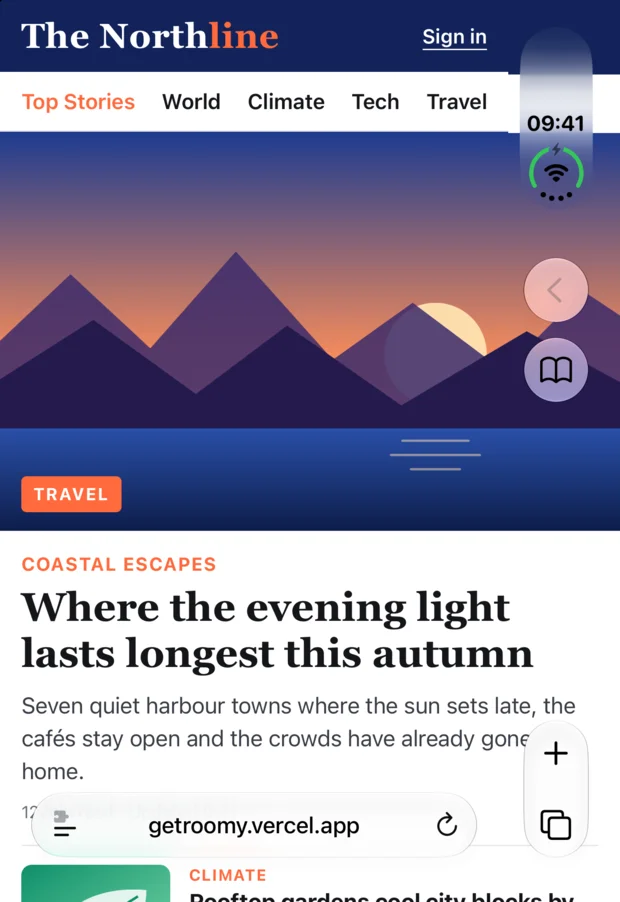
iPhone Duo front screen, Safari. Demo page with made-up content.
Pick what a site needs right from the extensions menu in Safari. Roomy remembers your choice for that website, so it looks the same next time.
The page extends into the space beside Safari's controls instead of leaving it blank.
Fixed headers and footers slide out of the way as you scroll down — and come back when you scroll up.
Lifts narrow width limits so articles use the whole screen instead of a slim strip in the middle.
The Roomy app keeps everything in one place.
See every website you've adjusted with its saved options. Edit them or reset a site with a tap.
Choose which options apply to websites you haven't configured yet.
A short guide walks you through turning on the extension, and the app shows whether it has been active.
Follow the system or choose appearance and language yourself.
Designed for the iPhone Duo's front screen. It runs on any iPhone too — there, full width mainly makes a difference in landscape.
No accounts, no analytics, no data collected. Your settings stay on your iPhone.
Results vary by website — some pages have fixed elements or their own layout limits.
Roomy collects no data. It only changes how pages are displayed — it does not read or send page content or your browsing history. The list of websites you've adjusted (just their names) is stored locally on your device.
One-time purchase, no subscription.
Free at launch – until November 8, then €0.99 once.
Websites von Rand zu Rand auf dem Außendisplay.
Auf dem Außendisplay des iPhone Duo zeigt Safari seine Bedienelemente in einer Seitenleiste – und die meisten Websites lassen den Platz daneben einfach leer. Mit Roomy änderst du das, Website für Website.
Außendisplay des iPhone Duo, Safari. Demo-Seite mit erfundenen Inhalten.
Wähle direkt im Erweiterungsmenü von Safari, was eine Seite braucht. Roomy merkt sich deine Wahl für diese Website – beim nächsten Besuch sieht sie wieder genauso aus.
Die Seite reicht bis in den Platz neben den Safari-Bedienelementen, statt ihn leer zu lassen.
Feste Kopf- und Fußleisten gleiten beim Runterscrollen weg – und kommen beim Hochscrollen zurück.
Hebt enge Breitenbegrenzungen auf, damit Artikel den ganzen Bildschirm nutzen statt eines schmalen Streifens in der Mitte.
Die Roomy-App behält den Überblick.
Alle angepassten Websites mit ihren gespeicherten Optionen. Bearbeiten oder zurücksetzen mit einem Tipp.
Lege fest, welche Optionen für Websites gelten, die du noch nicht eingestellt hast.
Eine kurze Anleitung hilft beim Aktivieren der Erweiterung, und die App zeigt, ob sie schon aktiv war.
Folge dem System oder wähle Darstellung und Sprache selbst.
Entwickelt für das Außendisplay des iPhone Duo. Läuft auch auf jedem anderen iPhone – dort wirkt die volle Breite vor allem im Querformat.
Keine Konten, keine Analyse, keine Datenerhebung. Deine Einstellungen bleiben auf deinem iPhone.
Das Ergebnis hängt von der Website ab – manche Seiten haben feste Elemente oder eigene Layout-Grenzen.
Roomy erhebt keine Daten. Die Erweiterung ändert nur, wie Seiten dargestellt werden – sie liest oder sendet weder Seiteninhalte noch deinen Browserverlauf. Die Liste der angepassten Websites (nur deren Namen) wird lokal auf deinem Gerät gespeichert.
Einmalkauf, kein Abo.
Zum Start kostenlos – bis 8. November, danach einmalig 0,99 €.